Esri retired legacy API keys from its product lifecycle on June 27, 2026. Existing keys are temporarily continuing to work during a grace period.
That grace period ends on April 15, 2027, when Esri will stop honoring the old keys for good.
If your GeoBlazor application uses a key created before June 27, 2024, or your ArcGIS portal has slapped an API key (legacy) label on it, you've got some housekeeping to do. It's probably better for you to handle this on your own schedule than find out mid-deploy that your basemaps quietly stopped loading.
The GeoBlazor side of this is genuinely boring. Create a replacement credential in ArcGIS, hand it the access your application actually needs, and swap the ArcGISApiKey value. No package upgrade, no component rewrite, no code review required.
Does This Affect Your Application?
This retirement only bites if your application authenticates to ArcGIS with a legacy API key. Open the key's item page in ArcGIS Online and look for the API key (legacy) label. Esri defines these as permanent access tokens issued before June 27, 2024 for ArcGIS Location Services, back when "permanent" apparently meant something different than it does now.
If your key came from an API key credentials item, you're already fine, this doesn't apply to you. Same goes for applications using OAuth user authentication or app authentication. Feel free to stop reading and go build some more maps!
A map that loads today with a legacy key doesn't mean everything underneath it is fine. Esri's own support notice warns that an application can keep opening while individual secured capabilities quietly break. Basemap styles, geocoding, routing, elevation, GeoEnrichment, or private item access can each fail on their own timeline, depending on what the old key was authorized to do. Not exactly the kind of failure I'd want to discover from a support ticket.
How Do You Create the Replacement API Key?
Open the legacy key in your ArcGIS portal and write down its service scopes. You're about to recreate those as privileges on the new credential, so don't skip this step unless you enjoy guessing. Note any private items the application needs to reach, too.
In ArcGIS Online:
-
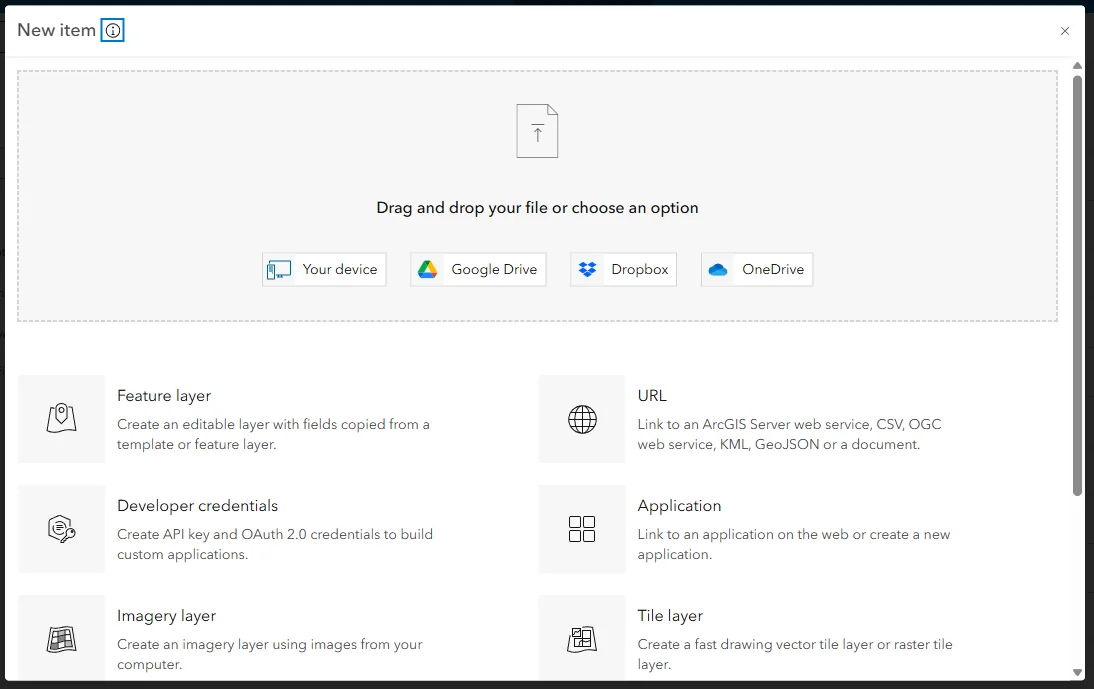
Go to Content > My content > New item.
-
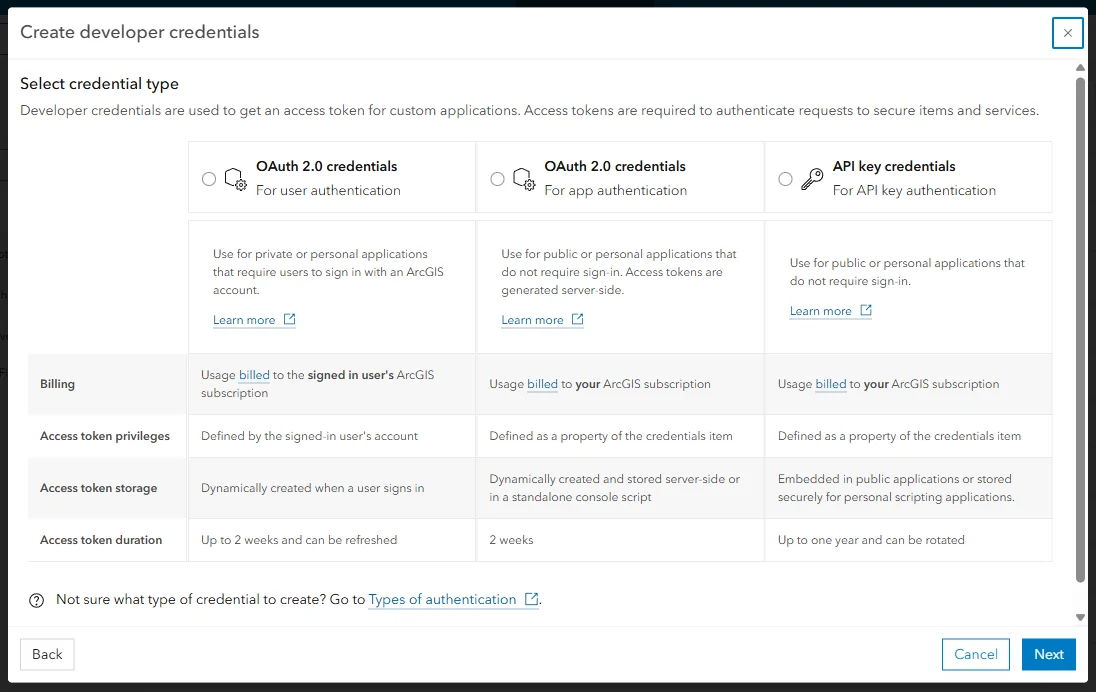
Select Developer credentials, then API key credentials.
-
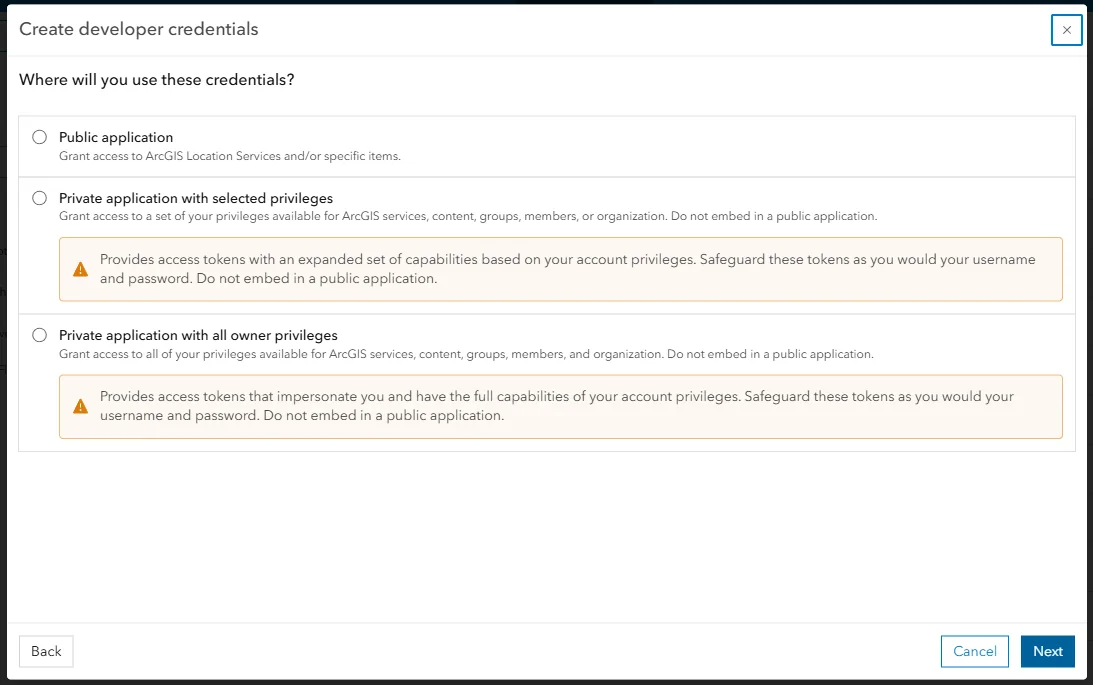
Choose the application type and grant access only to the items the application actually needs.
-
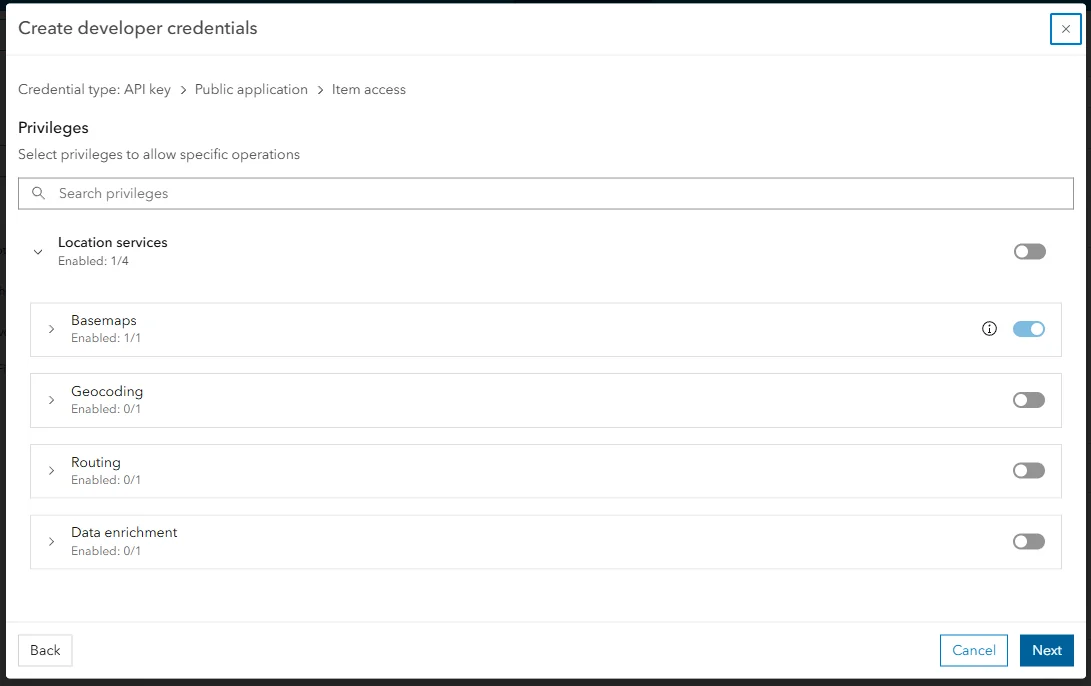
Select privileges that match the legacy key's service scopes.
-
Add allowed referrer URLs for your application environments.
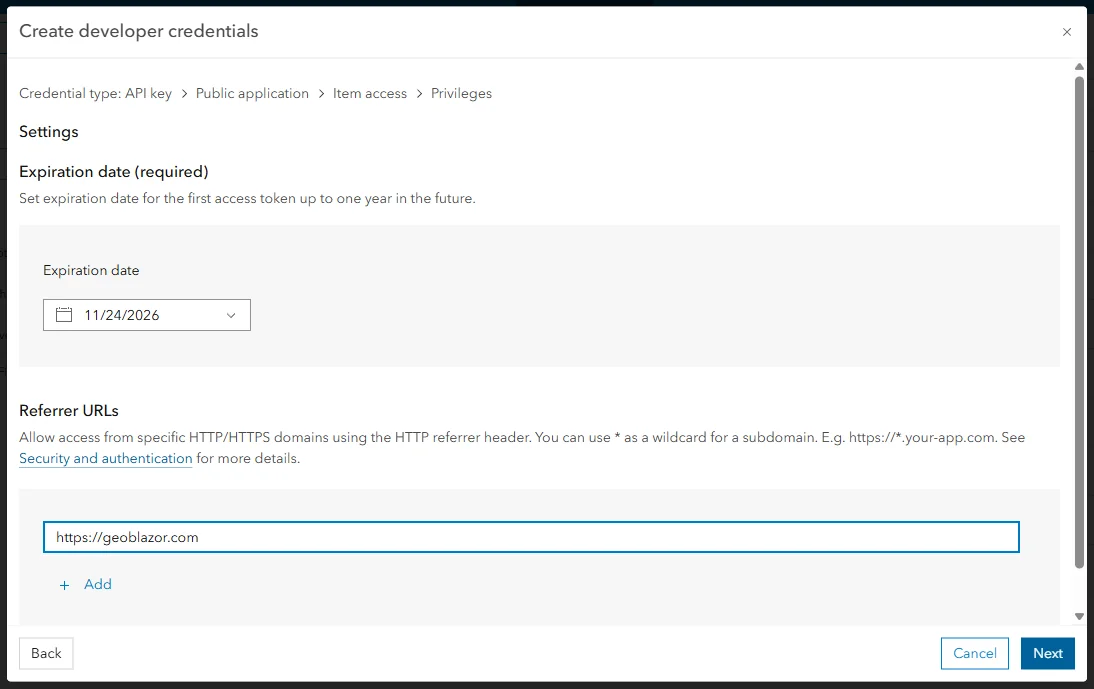
- Choose an expiration date, save the credential, and generate the API key.
-
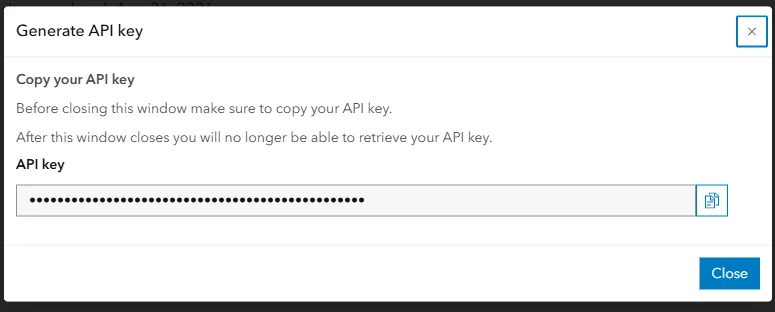
Copy the generated key immediately. Esri shows you the full value exactly once, so don't blink.
ArcGIS Online users need a Creator user type or higher, plus the Generate API keys and Assign privileges to OAuth 2.0 applications privileges. If those options are grayed out, bug an organization administrator to grant them through a custom role. It's a two-minute favor for them and it unblocks your whole afternoon.
Don't Forget About Expiration and Rotation
Here's the part that trips people up: unlike legacy keys, the new ones expire. Esri currently defaults new keys to three months and lets you pick anywhere from one day to a full year. I'm not sure why three months is the default rather than, say, six, but that's what you get. Either way, build key rotation into how you operate the application, because it never really finishes.
How Do You Update GeoBlazor?
GeoBlazor reads the ArcGIS key from the ArcGISApiKey configuration setting. Replace the value in whatever configuration source your application already uses:
{
  "ArcGISApiKey": "your-new-ArcGIS-api-key",
  "GeoBlazor": {
    "RegistrationKey": "your-GeoBlazor-license-key"
  }
}
{
  "ArcGISApiKey": "your-new-ArcGIS-api-key",
  "GeoBlazor": {
    "RegistrationKey": "your-GeoBlazor-license-key"
  }
}
The ArcGIS API key and the GeoBlazor registration key are two completely different credentials serving two completely different companies, so leave RegistrationKey alone. (Some projects may have this set as LicenseKey. That name works too, GeoBlazor treats the two as interchangeable.)
If your application sets the ArcGIS key at runtime through AuthenticationManager.ApiKey, just swap in the value from your secure configuration and initialize the authentication manager the same way it already does. Nothing about your map components needs to change.
One more thing if you're running Blazor WebAssembly: anything in your configuration ships straight to the browser, in plain view. An API key in a WebAssembly app was never a secret, it's more like a name tag. Keep its privileges narrow, lock down the allowed referrers, and never let it near confidential data. If you need something tighter, Esri points you toward OAuth user authentication or server-side app authentication instead.
How Do You Deploy and Verify the Replacement?
Esri recommends separate credentials per environment: development, staging, production. That keeps referrer restrictions and usage tracking specific to each one, and it means you can rotate a single key without taking down the other two.
After deploying, actually check every secured capability your application touches instead of assuming it works because the map rendered. Load each basemap style, run a real geocoding and routing request, and open any private portal items. Then check usage on the new credential's item page before you revoke the legacy key. Esri lets an API key credentials item hold two active keys at once, so the old key keeps working on Esri's side even after you've swapped your app's ArcGISApiKey to the new one, giving you a rollback path if something breaks. That's worth keeping in mind on every future rotation too.
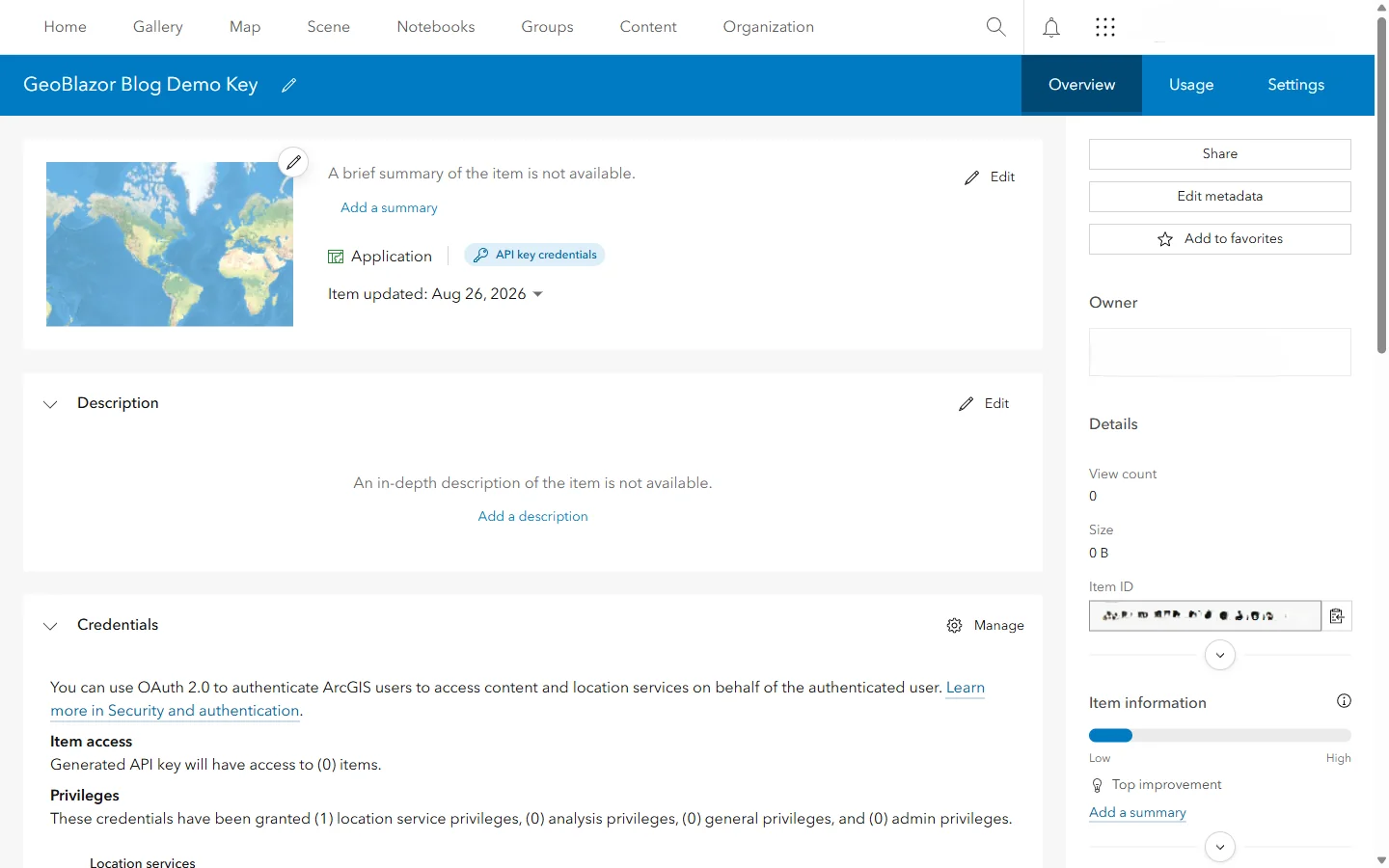
That Manage button is where you'll come back to generate the replacement key on the next rotation, without repeating the whole wizard.
Frequently Asked Questions
What happens if I do nothing, and could a failed map be caused by a legacy ArcGIS API key?
Until April 15, 2027, a retired legacy key may continue to work during Esri's grace period. After that date, ArcGIS services will reject it with an error stating that the legacy API key is invalid. The application may still open, but secured capabilities such as basemaps, geocoding, routing, elevation, GeoEnrichment, or private item access can stop working.
How do I know whether my GeoBlazor application uses a legacy ArcGIS API key?
Open the key's item page in ArcGIS Online. Affected keys are labeled API key (legacy) and were generally created before June 27, 2024. A key generated from an API key credentials item is not a legacy key.
Do I need to upgrade GeoBlazor to replace a legacy ArcGIS API key?
No. Create the replacement key in ArcGIS and replace the existing ArcGISApiKey configuration value. Your GeoBlazor package, map components, and GeoBlazor RegistrationKey (also accepted as LicenseKey) do not need to change for this migration.
Do new ArcGIS API keys expire?
Yes. Esri currently defaults new API keys to three months and allows an expiration between one day and one year. API key credentials can hold two active keys so you can deploy a replacement before revoking the previous key.
Is an ArcGIS API key secret in a Blazor WebAssembly application?
No. Configuration delivered to a browser is visible to users. Limit the key's privileges, restrict its allowed referrers, and use OAuth user authentication or server-side app authentication when the application needs sensitive or broad access.