
One of the most powerful features of Blazor is the JavaScript Interop functionality, which allows you to call JavaScript functions from C# and vice versa. In this article, we'll explore how to use IJSObjectReference and DotNetObjectReference to embed a JavaScript text editor in a Blazor application.
Understanding ObjectReferences
Blazor provides two key types for JavaScript interop:
- IJSObjectReference: Represents a reference to a JavaScript object that can be used to invoke functions on that object
- DotNetObjectReference: Represents a reference to a .NET object that can be passed to JavaScript and used to invoke .NET methods from JavaScript
These references are essential when working with JavaScript libraries that maintain state or require callbacks to your C# code.
IJSObjectReference: Calling JavaScript from C#
The IJSObjectReference interface allows you to call methods on a specific JavaScript object. This is particularly useful when working with JavaScript modules or libraries that export functions.
Here's how you can import a JavaScript module and get a reference to it:
private IJSObjectReference? _jsModule;

protected override async Task OnAfterRenderAsync(bool firstRender)
{
    if (firstRender)
    {
        _jsModule = await JS.InvokeAsync<IJSObjectReference>(
            "import", "./jsInterop.js");
    }
}
private IJSObjectReference? _jsModule;

protected override async Task OnAfterRenderAsync(bool firstRender)
{
    if (firstRender)
    {
        _jsModule = await JS.InvokeAsync<IJSObjectReference>(
            "import", "./jsInterop.js");
    }
}
Once you have the module reference, you can invoke functions from it:
await _jsModule.InvokeVoidAsync("initialize", editorElement);
await _jsModule.InvokeVoidAsync("initialize", editorElement);
DotNetObjectReference: Callbacks from JavaScript to C#
The DotNetObjectReference class wraps a .NET object so it can be passed to JavaScript. JavaScript code can then invoke methods on this object, creating a callback mechanism.
private DotNetObjectReference<Quill>? _dotNetRef;

protected override async Task OnAfterRenderAsync(bool firstRender)
{
    if (firstRender)
    {
        _dotNetRef = DotNetObjectReference.Create(this);
        await _jsModule.InvokeVoidAsync("initialize",
            editorElement, _dotNetRef);
    }
}

[JSInvokable]
public void OnTextChanged(string html)
{
    // This method can be called from JavaScript
    Html = html;
    StateHasChanged();
}
private DotNetObjectReference<Quill>? _dotNetRef;

protected override async Task OnAfterRenderAsync(bool firstRender)
{
    if (firstRender)
    {
        _dotNetRef = DotNetObjectReference.Create(this);
        await _jsModule.InvokeVoidAsync("initialize",
            editorElement, _dotNetRef);
    }
}

[JSInvokable]
public void OnTextChanged(string html)
{
    // This method can be called from JavaScript
    Html = html;
    StateHasChanged();
}
Example: Embedding Quill Text Editor
Let's see a complete example using the Quill rich text editor. We'll create a Blazor component that embeds Quill and synchronizes its content with a C# property.
Step 1: Create the JavaScript Module
First, create a JavaScript file (jsInterop.js) that will handle the Quill initialization and callbacks:
let quillInstances = {};

export function initialize(element, dotNetRef, editorId) {
    const quill = new Quill(element, {
        theme: 'snow',
        modules: {
            toolbar: [
                ['bold', 'italic', 'underline', 'strike'],
                ['blockquote', 'code-block'],
                [{ 'header': 1 }, { 'header': 2 }],
                [{ 'list': 'ordered'}, { 'list': 'bullet' }],
                [{ 'indent': '-1'}, { 'indent': '+1' }],
                ['link', 'image'],
                ['clean']
            ]
        }
    });

    // Store the instance for later use
    quillInstances[editorId] = quill;

    // Set up change handler
    quill.on('text-change', function() {
        const html = quill.root.innerHTML;
        dotNetRef.invokeMethodAsync('OnTextChanged', html);
    });
}

export function setContent(editorId, html) {
    const quill = quillInstances[editorId];
    if (quill) {
        quill.root.innerHTML = html;
    }
}

export function getContent(editorId) {
    const quill = quillInstances[editorId];
    return quill ? quill.root.innerHTML : '';
}
let quillInstances = {};

export function initialize(element, dotNetRef, editorId) {
    const quill = new Quill(element, {
        theme: 'snow',
        modules: {
            toolbar: [
                ['bold', 'italic', 'underline', 'strike'],
                ['blockquote', 'code-block'],
                [{ 'header': 1 }, { 'header': 2 }],
                [{ 'list': 'ordered'}, { 'list': 'bullet' }],
                [{ 'indent': '-1'}, { 'indent': '+1' }],
                ['link', 'image'],
                ['clean']
            ]
        }
    });

    // Store the instance for later use
    quillInstances[editorId] = quill;

    // Set up change handler
    quill.on('text-change', function() {
        const html = quill.root.innerHTML;
        dotNetRef.invokeMethodAsync('OnTextChanged', html);
    });
}

export function setContent(editorId, html) {
    const quill = quillInstances[editorId];
    if (quill) {
        quill.root.innerHTML = html;
    }
}

export function getContent(editorId) {
    const quill = quillInstances[editorId];
    return quill ? quill.root.innerHTML : '';
}
Step 2: Create the Blazor Component
Now create a Blazor component (Quill.razor) that wraps the Quill editor:
@inject IJSRuntime JS
@implements IAsyncDisposable

<div>
    <div @ref="_editorElement" class="quill-editor"></div>
</div>

@code {
    private ElementReference _editorElement;
    private IJSObjectReference? _jsModule;
    private DotNetObjectReference<Quill>? _dotNetRef;
    private string _editorId = Guid.NewGuid().ToString();

    [Parameter]
    public string? Html { get; set; }

    [Parameter]
    public EventCallback<string> HtmlChanged { get; set; }

    protected override async Task OnAfterRenderAsync(bool firstRender)
    {
        if (firstRender)
        {
            _jsModule = await JS.InvokeAsync<IJSObjectReference>(
                "import", "./jsInterop.js");

            _dotNetRef = DotNetObjectReference.Create(this);

            await _jsModule.InvokeVoidAsync(
                "initialize", _editorElement, _dotNetRef, _editorId);

            if (!string.IsNullOrEmpty(Html))
            {
                await _jsModule.InvokeVoidAsync("setContent", _editorId, Html);
            }
        }
    }

    [JSInvokable]
    public async Task OnTextChanged(string html)
    {
        Html = html;
        await HtmlChanged.InvokeAsync(html);
    }

    public async ValueTask DisposeAsync()
    {
        if (_jsModule != null)
        {
            await _jsModule.DisposeAsync();
        }

        _dotNetRef?.Dispose();
    }
}
@inject IJSRuntime JS
@implements IAsyncDisposable

<div>
    <div @ref="_editorElement" class="quill-editor"></div>
</div>

@code {
    private ElementReference _editorElement;
    private IJSObjectReference? _jsModule;
    private DotNetObjectReference<Quill>? _dotNetRef;
    private string _editorId = Guid.NewGuid().ToString();

    [Parameter]
    public string? Html { get; set; }

    [Parameter]
    public EventCallback<string> HtmlChanged { get; set; }

    protected override async Task OnAfterRenderAsync(bool firstRender)
    {
        if (firstRender)
        {
            _jsModule = await JS.InvokeAsync<IJSObjectReference>(
                "import", "./jsInterop.js");

            _dotNetRef = DotNetObjectReference.Create(this);

            await _jsModule.InvokeVoidAsync(
                "initialize", _editorElement, _dotNetRef, _editorId);

            if (!string.IsNullOrEmpty(Html))
            {
                await _jsModule.InvokeVoidAsync("setContent", _editorId, Html);
            }
        }
    }

    [JSInvokable]
    public async Task OnTextChanged(string html)
    {
        Html = html;
        await HtmlChanged.InvokeAsync(html);
    }

    public async ValueTask DisposeAsync()
    {
        if (_jsModule != null)
        {
            await _jsModule.DisposeAsync();
        }

        _dotNetRef?.Dispose();
    }
}
Step 3: Use the Component
Finally, use the Quill component in your page:
@page "/editor"

<h1>Rich Text Editor</h1>

<Quill @bind-Html="_content" />

<div class="preview">
    <h2>Preview</h2>
    @((MarkupString)_content)
</div>

@code {
    private string _content = "<p>Start typing here...</p>";
}
@page "/editor"

<h1>Rich Text Editor</h1>

<Quill @bind-Html="_content" />

<div class="preview">
    <h2>Preview</h2>
    @((MarkupString)_content)
</div>

@code {
    private string _content = "<p>Start typing here...</p>";
}
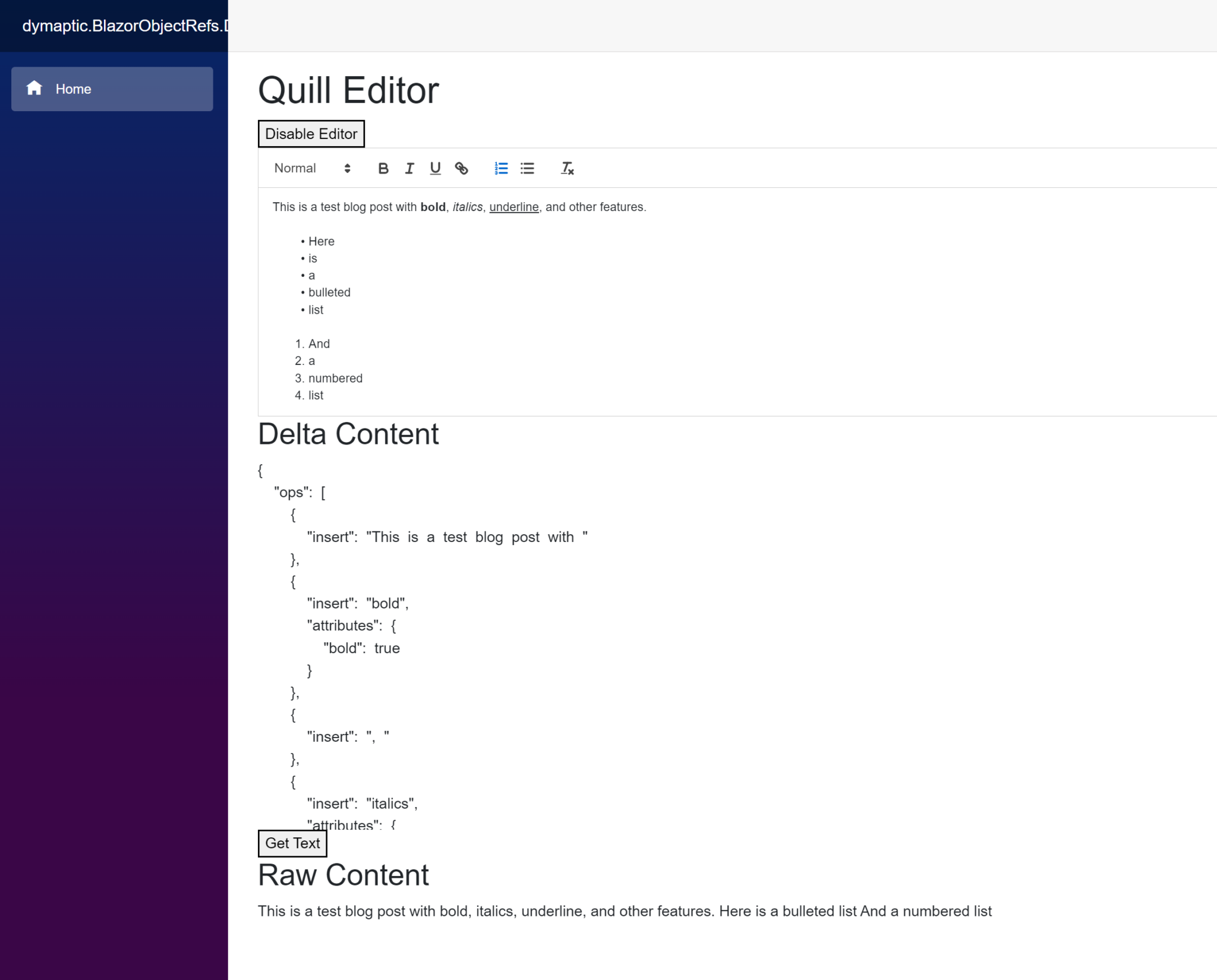
Review: Key Concepts
Let's review the key concepts we've covered:
IJSObjectReference
- Obtained by importing a JavaScript module using
JS.InvokeAsync<IJSObjectReference>("import", "path") - Represents a reference to a JavaScript object or module
- Allows you to invoke functions exported from that module
- Should be disposed when no longer needed
DotNetObjectReference
- Created using
DotNetObjectReference.Create(this) - Wraps a .NET object so it can be passed to JavaScript
- JavaScript can call methods on the wrapped object using
dotNetRef.invokeMethodAsync('methodName', args) - Methods that can be called from JavaScript must be marked with
[JSInvokable] - Should be disposed when no longer needed
Best Practices
- Dispose properly: Always implement
IAsyncDisposableand dispose bothIJSObjectReferenceandDotNetObjectReferenceobjects - Use firstRender flag: Initialize JavaScript interop only once by checking the
firstRenderparameter inOnAfterRenderAsync - Mark methods as JSInvokable: Any method that JavaScript needs to call must have the
[JSInvokable]attribute - Handle null references: Always check for null before invoking methods on object references
- Use unique identifiers: When managing multiple instances (like multiple editors), use unique IDs to track them
Conclusion
The ObjectReference pattern is essential for integrating JavaScript libraries into Blazor applications. By using IJSObjectReference and DotNetObjectReference, you can create seamless interop between C# and JavaScript, enabling you to leverage the rich ecosystem of JavaScript libraries while maintaining clean, type-safe C# code.
This pattern is used extensively in GeoBlazor to integrate the ArcGIS Maps SDK for JavaScript with Blazor, allowing developers to build powerful mapping applications using familiar C# and Razor syntax.
Want to learn more about Blazor and JavaScript interop?
- Get Started with GeoBlazor - See ObjectReferences in action with mapping components
- Read the Documentation - Explore our comprehensive guides and API reference
- View Sample Applications - See real-world examples of JavaScript interop
- Join Our Discord - Discuss Blazor development with the community